今天在全新的 VM 中安裝 Apache 2.2.17 要 Enable SSL , 做到 Apache\bin>openssl req -new -key mybase.key -x509 -out svr01.crt 這個步驟時出問題 , 錯誤訊息 : Unable to load config info from /usr/local/ssl/openssl.cnf
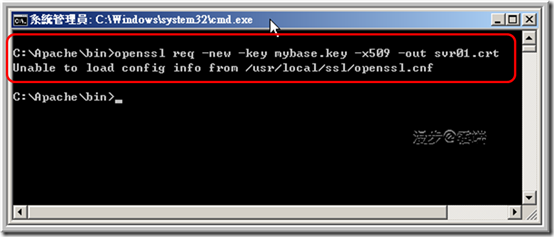
拜了 Google 大神 , 有人說這樣下指令可以解 : Apache\bin>openssl req
-config C:\apache\config\openssl.cnf -new -key mybase.key -x509 -out svr01.crt , 但是我的遇到的狀況還是無解 :
Jump 發表在 痞客邦 留言(0) 人氣(646)
 一、簡介
一、簡介
The Apache HTTP Server module mod_ssl provides an interface to the OpenSSL library, which provides Strong Encryption using the Secure Sockets Layer and Transport Layer Security protocols.
二、資源
• 作業環境:Windows Server 2008 Enterprise 32bits
Jump 發表在 痞客邦 留言(0) 人氣(16,158)
 一、簡介
一、簡介
The OpenSSL Project is a collaborative effort to develop a robust, commercial-grade, full-featured, and
Open Source toolkit implementing the
Secure Sockets Layer (SSL v2/v3) and
Transport Layer Security (TLS v1) protocols as well as a full-strength general purpose cryptography library. The project is managed by a worldwide community of volunteers that use the Internet to communicate, plan, and develop the OpenSSL toolkit and its related documentation.
Jump 發表在 痞客邦 留言(0) 人氣(15,208)
我自己有維護一個網站 (含 Linux 主機 + Apache),有些放檔案及圖片的資料夾沒有做保護,用瀏覽器就可以看到整個資料夾的索引,也可以任意下載裡面的檔案,後來知道可以在每個資料夾下放 .htaccess 檔來做保護,扒了一些中文的相關文章都有讀沒有懂,擺了 .htaccess 檔也沒用,最後讀了這篇原文說明 (Apache Tutorial: .htaccess files) 再加上實際測試才搞通 !
原來別人應該是以架設在網頁空間中的網站做說明的,這種狀況只要把
.htaccess 檔 (裡面要有這個語法 - Options
All –Indexes) 放在你要保護的資料夾下就可以了,但是以我的狀況來說,這種做法並不是最佳做法,而且會影響整個網站的效能,建議做法是直接在 httpd.conf 檔中為每一個要保護的資料夾加下列的語法: Jump 發表在 痞客邦 留言(0) 人氣(340)
 程式交易 (3)